CRM vs. Automation Platform for Home Service Companies
A plain-language decision guide for home-service owners comparing CRM tools, automation platforms, and the follow-up systems that actually turn leads into repeat work.
Why the CRM vs. automation question is confusing
Home-service owners usually do not wake up wanting software. They want missed calls followed up, estimates chased, appointments confirmed, reviews requested, and past customers reminded before the next season hits. Because many tools use the same sales language, it is easy to compare a CRM and an automation platform as if they solve the same problem.
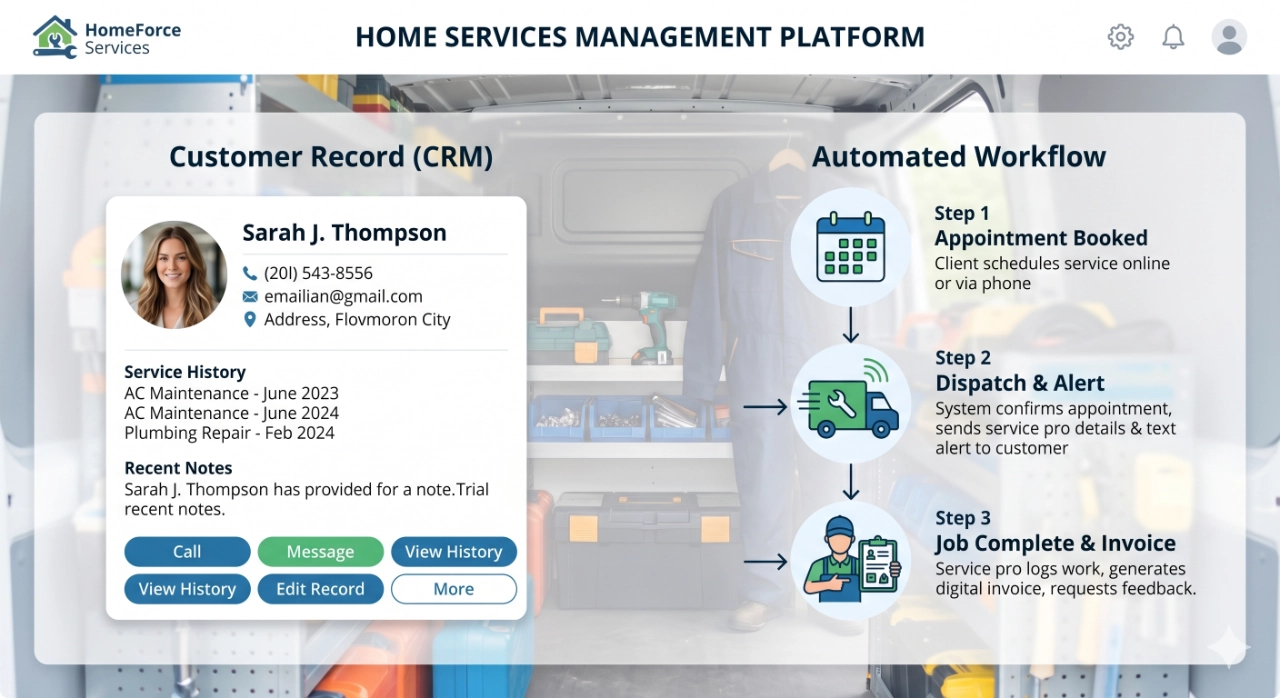
A simple way to separate them is this: a CRM is where customer information lives. An automation platform is what makes the next step happen. The CRM should help your team see the lead, customer, job history, estimate status, and notes. Automation should move work forward when nobody has time to remember every manual follow-up.
That distinction matters for contractors, HVAC companies, plumbers, pool service teams, landscapers, cleaners, and other local service businesses because growth breaks down in the handoffs. A lead comes from Google, a form, a phone call, or a referral. Someone needs to respond quickly, schedule clearly, follow up after the job, ask for a review, and keep the customer warm for recurring service. The question is not which category sounds more advanced. The question is where your current follow-up breaks.
What a CRM should do for a home-service company
A CRM should give your team a reliable customer record. At minimum, it should show who the customer is, how they contacted you, what service they need, where they are located, what was quoted, what was scheduled, what was completed, and what should happen next. If your team cannot answer those questions quickly, the CRM is not doing its basic job.
For a small home-service company, a CRM is often enough when the owner or office manager can still personally manage the pipeline. You may need a clean list of open leads, estimate follow-ups, scheduled jobs, completed jobs, and customers who are good candidates for maintenance plans. The CRM should reduce confusion, not create a second place where work disappears.
A CRM also helps with local marketing attribution. When new opportunities come through your website, Google Business Profile, or referral channels, the customer record should make it easier to see which leads became booked jobs. That insight helps you decide where to invest in lead generation instead of judging marketing only by call volume. Buckeye GMB's lead-generation work is strongest when the business can see which leads moved from inquiry to estimate to booked work.
What an automation platform should do
An automation platform should execute repeatable workflows. It can send a speed-to-lead text or email after a form submission, route a new opportunity to the right person, remind the team when an estimate has not been followed up, confirm appointments, trigger review requests after completed jobs, and start seasonal or recurring-service reminders at the right time.
Good automation does not replace judgment. It removes the routine steps that are too important to leave to memory. A customer who requested a quote should not wait until someone checks a spreadsheet. A completed job should not rely on a technician remembering to ask for a review. A maintenance-plan customer should not go quiet until they call a competitor next season.
For home-service companies, automation becomes especially useful when leads are coming from several places, jobs are scheduled across multiple crews, or the business wants to grow recurring revenue. The workflow can keep the customer journey moving while the team stays focused on answering urgent calls and completing the work in the field.
Decision framework by business stage
If you are still owner-led and handling a low volume of leads, start with a simple CRM and a disciplined follow-up process. Make sure every lead has a source, status, next step, and owner. If the real problem is that customer details are scattered across phones, inboxes, notebooks, and spreadsheets, automation will only make the mess faster.
If you have steady lead flow but inconsistent booking, add automation around speed-to-lead and estimate follow-up. This is where many local service businesses lose money. They are getting visibility from Google, but the response window is too slow or too manual. The first useful workflows are usually new-lead alerts, instant acknowledgment messages, missed-call follow-up, and reminders when estimates sit untouched.
If you have multiple crews, repeat customers, maintenance plans, or seasonal service cycles, automation should support scheduling communication, review requests, win-back campaigns, and recurring-service reminders. At that stage, the CRM is still the record, but the automation platform becomes the system that keeps revenue opportunities from aging out.
If your business is investing in SEO, Google Business Profile support, or paid lead sources, the CRM and automation decision should happen before you buy more traffic. More leads will not fix a broken intake process. A better system helps make sure the demand you already have is answered, tracked, and followed through.
Common mistakes to avoid
The first mistake is buying a complex platform before the process is clear. Software cannot decide your lead stages, follow-up rules, service categories, or review timing for you. Write down the workflow first: new lead, qualified lead, estimate sent, follow-up due, booked job, completed job, review request, recurring-service opportunity.
The second mistake is treating automation as a replacement for human communication. Home-service customers still care about trust, timing, and clarity. Automated messages should confirm, remind, and route. They should not make customers feel trapped in a generic sequence when they need a real answer.
The third mistake is separating marketing from operations. Your Google visibility, website conversions, customer reviews, and recurring-service growth all depend on what happens after the lead arrives. Buckeye GMB connects those pieces by helping local service companies improve lead-generation pages, Google Business Profile signals, review support, and practical follow-up workflows that support repeat revenue.
Next steps before choosing a tool
Before comparing vendors, list the customer moments that are currently most likely to be missed. For many home-service companies, those moments are first response, estimate follow-up, appointment confirmation, review request, and seasonal maintenance reminders. Then decide which moments need a better record and which moments need automatic execution.
A CRM is enough when your main need is visibility: who the customer is, what they asked for, where the job stands, and who owns the next step. An automation platform becomes necessary when the next step has to happen consistently even when the office is busy, the owner is in the field, or lead volume spikes.
If you are unsure, start with the workflow, not the software. Buckeye GMB can help review your current lead flow, recurring-service opportunities, and GBP/review process so you can choose a right-sized system before adding more tools or buying more traffic.
RESOURCES
See how Buckeye GMB helps local service companies turn search demand into booked jobs.
Build follow-up and maintenance workflows that create repeat revenue instead of one-time jobs.
Review Buckeye GMB's local SEO, GBP, and automation support for home-service businesses.
Ask Buckeye GMB to review whether your follow-up problem is a CRM issue, an automation issue, or both.
Map the follow-up system your service business actually needs.
Buckeye GMB helps home-service companies connect lead generation, GBP visibility, review requests, and recurring-service follow-up into a practical system your team can use.
Review the System